
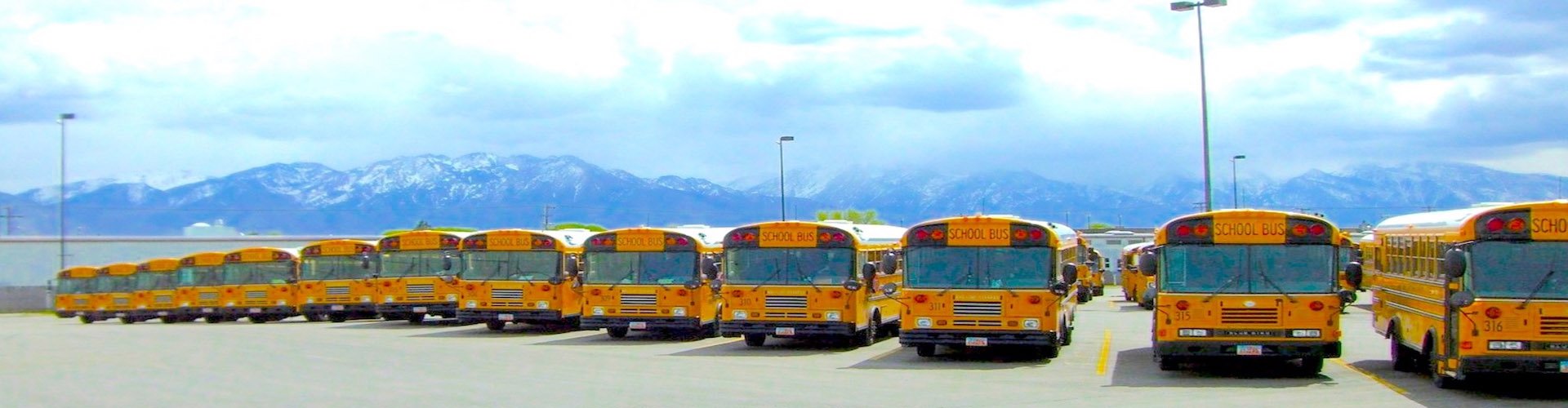
The photo is of a DEM aka, aka Driver Event Marker button.
A DEM is often used to mark on the recording what time and date some incident occurred for easier review or downloading of the event at a later time.
Several applications use the DEM to mark video recordings when something happened.
For example, when a school bus driver is operating a School Bus Stop Arm Camera, they automatically start recording when the bus stops and the stop arm is extended, alerting the driver that children are loading or unloading.
Another example is in the Warehouse 5th Wheel King Pin Trailer CS1 Spotter Yard Mule Camera application, where a warehouse yard mule operator is moving trailers from dock to dock for loading and unloading. If they have a collision or a rough load shift from a high hitch move, they can press the DEM and review it later without having to view the entire day's video files.
Frequently, the DEM is used to document prisoners hurting themselves in the Police Patrol Wagon Suspect, Prisoner & Inmate in-Custody Transport Camera. application.
The cameras record an inmate repeatedly slamming their own head against a wall to make it look like the police beat them up. The officers in the front watch the video live, then press the button to capture the inmate hurting themselves for later review.
Lastly, Forklift HD Industrial Operator Safety Camera Systems often come standard with the DEMs so the lift operator can document bumps and damaged containers or pallets of merchandise.
Bus video event marker button

Digital Mobile Video Solutions Links:
Digital Mobile Video Application Links:
School Bus Child Safety Surveillance Cameras
Special Needs Child Transport Bus Video Observation Camera Solutions
Waste Collection Safety Surveillance Digital Expert Witness Camera
Paratransit Passenger Safety Observation Surveillance Solution
Stop Arm Camera License Plate Capture HD Solution
School Bus or Transit Bus 360 Degree Birds Eye View Ceiling Camera
School Bus or Transit Bus Seat Vandalism Surveillance Security Camera High Definition Digital Witness
Elderly Day Care Shuttle & Assisted Living Transportation Security Surveillance Digital Witness Camera Recorder
Heavy Duty Forklift Boom, Crane, Pallet Truck Operator Vision Safety Camera System
Police Prisoner Inmate In-Custody Transport Surveillance Expert Witness Camera
Cannabis Transport Vehicle Camera Recorder
CS1 Spotter Trailer Swapper 5th Wheel King Pin Trailer Switcher Camera Recorder Safety System
Forklift Skid Pallet Wheel Loader, Order Picker Truck High Definition Operator Safety Camera & DVR
Armored Vehicle VIP Transport Video Camera Systems
Transportation Ministry Youth Activities Church Bus Camera System
Wireless Industrial Truck Forklift Blade Mounted Magnetic Camera
Alternative School & Juvenile Detention Bus Security Camera
Private Service Student Contractor Charter Bus Camera Compliance
For More Information:
sales@AmericanBusVideo.com
Toll-Free 866.468.8042
sales@AmericanBusVideo.com
Toll-Free 866.468.8042
All Rights Reserved. © American Bus Video Inc. 2025